


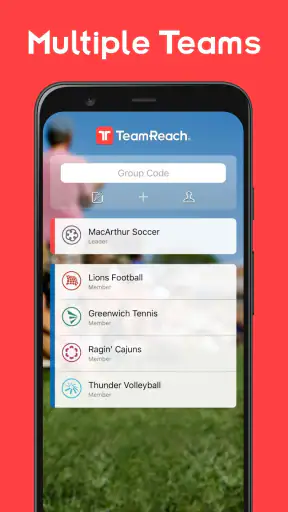
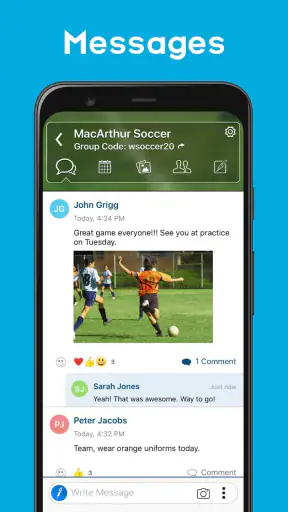
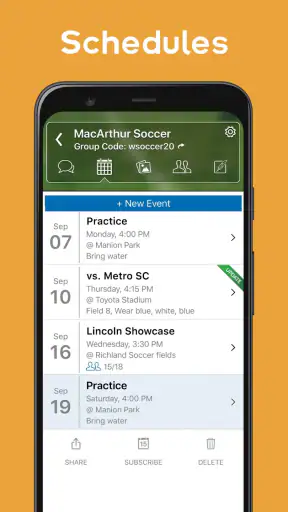
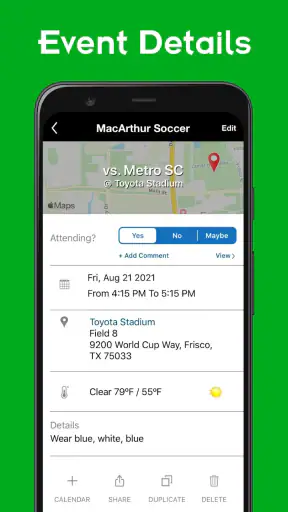
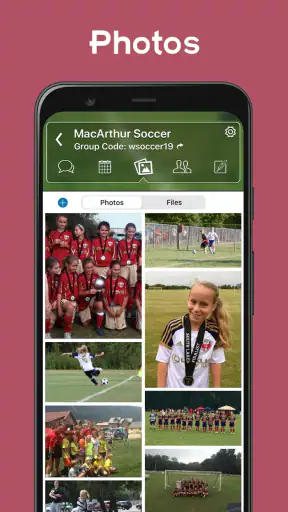
When a sports team is small enough to know one another but busy enough to miss messages, coordination becomes surprisingly difficult. I found TeamReach most useful in that exact gap: it gives a team, club, or shared group one place for updates instead of scattering information across personal chats, social networks, and last-minute calls. It is a free sports app from TeamReach, rated for Everyone, and its appeal is less about flashy tools than about creating a dependable meeting point for people who need the same information.
I would not describe it as a complete replacement for every messaging service. Its value depends on whether your group actually commits to using one shared space. When that happens, it can make practice reminders, schedule changes, and group notices easier to follow. When people continue replying in several other apps, the benefit drops quickly. That practical trade-off shaped my experience more than the feature list did.
How TeamReach fits a shared household
A realistic example is a household with one child playing on a local team, a parent handling transport, and another adult occasionally covering pickup. The team’s information may arrive while one person is at work, driving, or looking after someone else. With TeamReach installed on the relevant phones, each person can check the same group instead of relying on a forwarded screenshot or a message passed verbally across the kitchen.
That shared-use pattern is where the app feels most sensible. It is not necessary for every family member to participate in every conversation. The useful boundary is deciding who genuinely needs access to the team’s updates and who only needs occasional information from another household member. Keeping that distinction clear prevents a team group from becoming a general family chat.
I also like the fact that the app’s purpose is easy to explain to a new participant: this is the place to check team communication. That clarity matters in homes with shared tablets or phones, too. A device used by several people can become a practical viewing point for schedules and notices, but I would avoid treating it as a substitute for each person having an appropriate account or access arrangement. Shared hardware does not automatically create shared responsibility.
The app has passed one million installs, which suggests that its basic idea has found a substantial audience. Its average rating is 3.4 from around 2.9 thousand ratings, with roughly 1.1 thousand written reviews. I read that combination as a useful warning: plenty of groups find the concept worthwhile, but the experience is not universally smooth. In practice, group habits and communication discipline matter as much as the application itself.
Start with a clear household plan
Before joining a team group, I would decide who needs to see messages, who is responsible for checking them, and how urgent changes will be handled. TeamReach can centralize communication, but it cannot make a household notice an update that nobody opens. A simple agreement helps: one adult checks the group at a predictable time, then shares relevant transport information with anyone who needs it.
That approach is especially helpful when a child uses a parent’s device. The child may need to know when practice starts, while the adult needs the practical details about arrival and pickup. Rather than handing over the phone and leaving the child to interpret everything, I would keep the adult responsible for decisions and use the app as the common source of team information.
This is also a good reason not to create unnecessary duplicate participation. If several household members join the same group without a clear reason, important messages can become harder to track, especially when each person assumes someone else has read them. A smaller, intentional access circle is often more reliable than giving everyone access by default.
Setup boundaries and everyday coordination
TeamReach works best when the setup reflects the real structure of the group. A single team should not be expected to carry every conversation about a family, school, or wider social circle. I would use the team space for team-related communication and keep personal arrangements separate. That separation makes it easier to identify which messages require action and which are simply background discussion.
The first useful habit is to treat the group as a noticeboard with conversation attached. I would check recent posts before asking a question, because someone may already have shared the answer. This reduces repeated questions and helps preserve attention for changes that affect everyone. It also makes the group more welcoming to people who do not want to scroll through a long stream of duplicated information.
A second, less obvious tip is to translate team information into household actions immediately. If a message changes the meeting point, I would add that detail to the family’s own plan rather than assuming the app will remember it for everyone. If a practice is cancelled, I would confirm who has seen the change before rearranging transport. The app can gather the information, but the household still needs a small routine for acting on it.
A third trade-off concerns urgency. A group communication app is useful for shared updates, but I would not assume that a post is the same as a guaranteed real-time alert. For an immediate safety or pickup issue, I would use the most direct contact method available to the people involved and then use the group to keep everyone else informed. That is not a criticism of TeamReach so much as a sensible boundary for any group-based tool.
For coaches or organizers, the main benefit is reducing the number of places where an announcement must be repeated. The main responsibility is writing messages that can be understood quickly. A short note with the activity, timing, location, and any required response is much more useful than a vague reminder. The app cannot repair unclear communication, so the person posting still determines much of the experience.
Where it beats ordinary chat
Compared with a standard one-to-one messaging app, TeamReach gives the group a more obvious center of gravity. A private chat is excellent for a quick conversation between two people, but it becomes awkward when information must reach an entire team or when new participants need the same context. A general social network may offer more entertainment and broader interaction, yet that extra activity can bury a simple sports update.
Its advantage over an informal family relay is even clearer. If one parent receives a schedule change and forgets to pass it on, the household is working from incomplete information. A shared team space reduces that dependency. It does not eliminate misunderstandings, but it gives people a common place to verify what was said.
There is a cost to that focus. People who want advanced project planning, detailed document collaboration, or deep personal-chat controls may find a broader communication platform more suitable. TeamReach is most convincing when the problem is “where should this team update go?” rather than “how can we manage every part of our community digitally?”
I would also avoid comparing it too closely with a full calendar application. A calendar is better for personal time planning, recurring household commitments, and reminders that belong to one individual. TeamReach is better as the communication layer where a group shares information. In my preferred setup, the app supplies the team context and the household’s own calendar handles personal commitments. Trying to force one tool to do both jobs can create avoidable confusion.
Age, trust, and account boundaries
The Everyone content rating makes the app approachable for a broad audience, but an age label should not be mistaken for a complete household policy. I would still decide which adult is responsible for interpreting team messages, especially when younger participants use a shared device. The important question is not simply whether someone can open the app; it is whether they understand which information is appropriate to act on and who should be contacted when something is unclear.
Trust matters because group communication often includes practical details about activities and attendance. I would encourage children to ask an adult before responding to an unfamiliar request or making a change to transport plans. That is a general digital-safety habit, but it is particularly useful in a group environment where several people may post and not every message has the same urgency.
Households should also keep account boundaries understandable. If multiple people use one device, I would avoid leaving the app open in a way that makes it unclear who is reading or responding. A shared screen can be convenient for checking information, but a personal response should come from the person who is actually responsible for it. This is one of the places where a family’s routine matters more than the app’s simplicity.
For a young athlete, the most useful role may be reading the team’s information while an adult handles commitments, transport, and sensitive decisions. For an older teenager, it may be reasonable to take more responsibility for checking updates and communicating availability. TeamReach can support either arrangement as a shared communication point, but the household has to define the handoff clearly.
I would not recommend joining every available group simply because access is convenient. A focused list of relevant teams or clubs is easier to monitor and less likely to expose a household member to information that has nothing to do with them. This is another non-obvious strength of thinking about the app as a boundary-setting tool rather than just a message feed.
What may frustrate regular users
The rating suggests that some users encounter friction, and I can understand why. A group app depends on consistent participation. If the coach posts in TeamReach but several parents continue using a separate chat, people must check both places. That defeats the central promise of having one reliable channel and can make the app feel like another obligation rather than a simplification.
There is also a human limitation: centralization can create a false sense of completeness. A person may see a recent post and assume they know everything, even though a private conversation contains a relevant detail. I would keep team-wide information in the shared group and use direct contact only for genuinely individual matters, while making sure important changes are not hidden in a private exchange.
The free price makes trying the app easy, but in-app purchases range from less than a dollar to just under ten dollars per item. That means I would review any purchase prompt carefully before approving it, particularly on a shared device or a child’s device. The app can be evaluated without treating optional spending as part of the basic decision, and a household should agree on who can authorize purchases.
The current version is 10.0.3, and the minimum operating system is Android 7.0. Those details matter if an older household phone is being reused for team communication. A compatible device is only the first step; the phone also needs to be dependable enough for the person checking messages. If the device is slow, shared constantly, or rarely connected, a different arrangement may be more practical.
Who should use it, and who should skip it
I would recommend TeamReach to local sports teams, recreational clubs, and households that need a straightforward shared channel for group updates. It is especially suitable when the organizer wants everyone to look in the same place and the participants do not need a complicated management system. The app’s sports focus gives the communication a clear purpose instead of turning it into another general-purpose social feed.
I would be more cautious for a large organization with many departments, complex permissions, formal records, or intensive scheduling needs. In that setting, a dedicated management platform may offer stronger structure. I would also skip it if the group has already settled on a reliable tool and nobody is willing to change habits. Adding TeamReach on top of an established system will create duplication unless the organizer makes one channel clearly authoritative.
It may not be the best choice for a household looking for detailed parental controls, a private family journal, or a full calendar replacement. Its role is narrower and more useful because of that narrowness. I see it as a shared team communication layer, not as a complete digital home-management system.
Before committing, I would ask four practical questions. Will the coach or organizer consistently post there? Who in the household will check it? Which messages require a direct response? And where will personal schedules be maintained? If the answers are clear, the app has a good chance of reducing confusion. If the answers are vague, the group may simply add another inbox.
My household verdict
After using it as a team-centered communication tool, I think TeamReach earns its place when a household needs shared visibility without turning sports coordination into a sprawling project. Its best quality is straightforwardness: one relevant group can bring updates closer to the people who need them, including adults sharing transport duties or checking information on behalf of a younger participant.
My recommendation comes with a condition: establish boundaries on the first day. Decide who joins, what belongs in the group, how urgent matters are handled, and which household calendar or conversation manages personal commitments. Those small decisions prevent most of the confusion that can make a group app feel ineffective.
TeamReach is free, available to a broad age audience, and built by TeamReach for sports, clubs, and groups. I would try it for a team that currently relies on scattered messages, while keeping expectations realistic about participation and follow-through. The app can centralize communication, but the household still supplies the trust, attention, and routines that make coordination work.
For my own recommendation, that makes it a practical choice for organized teams and shared-device households that want a clear place to check updates. It is not the right answer for every communication problem, but when the need is simply to keep a sports group aligned, it solves a real everyday problem without asking families to build an elaborate system around it.


